Set Up your AI Coding Agent: From Premium to Free
You open ChatGPT or Claude and ask it to do something for you.
Let’s say it’s part of your job, to do a comparison of two spreadsheets which has the same data from two different sources, every week. You have to find out and report the mismatches in the data. To save your time, you paste the spreadsheets into ChatGPT and ask it to do it for you, trusting that each time ChatGPT will do it with 100% accuracy.
Another way is to ask ChatGPT for a formula that finds the mismatches and helps you generate a report. This is more accurate but you will have to do the process again if it’s a different set of data in another domain.
Or maybe you have some coding experience and ask it to write a function and it responds with some code. You copy the code, paste it into your editor, and hit run. Something breaks, so you paste the error back into the chat. It apologizes and hands you a fix, and you copy that one too and repeat.
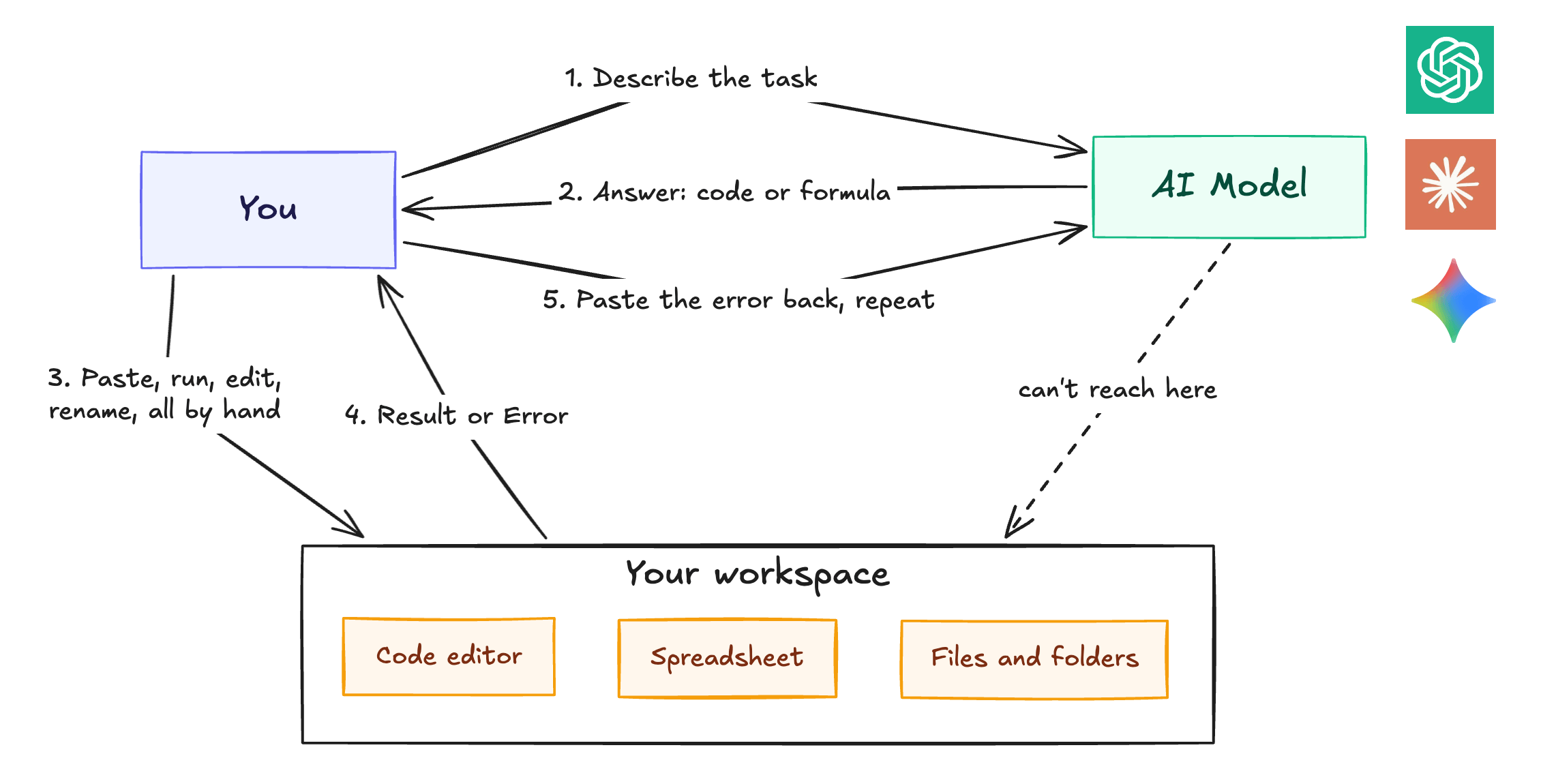
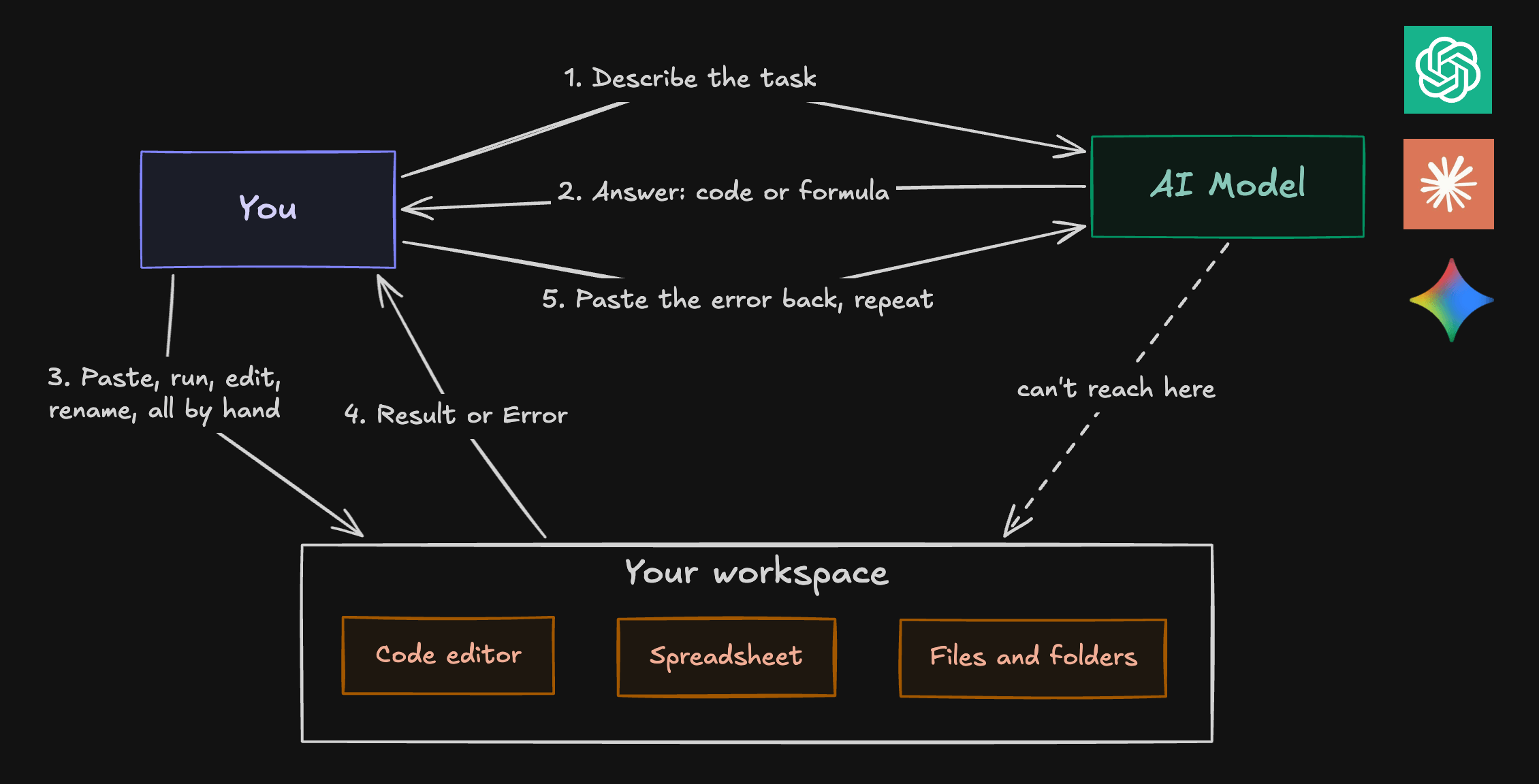
In both cases, when you tried it out in the chat box the first time, it felt like magic. Maybe it still feels like magic but…
“There’s a lot you can do beyond that chat box.”
Why use a Coding Agent?
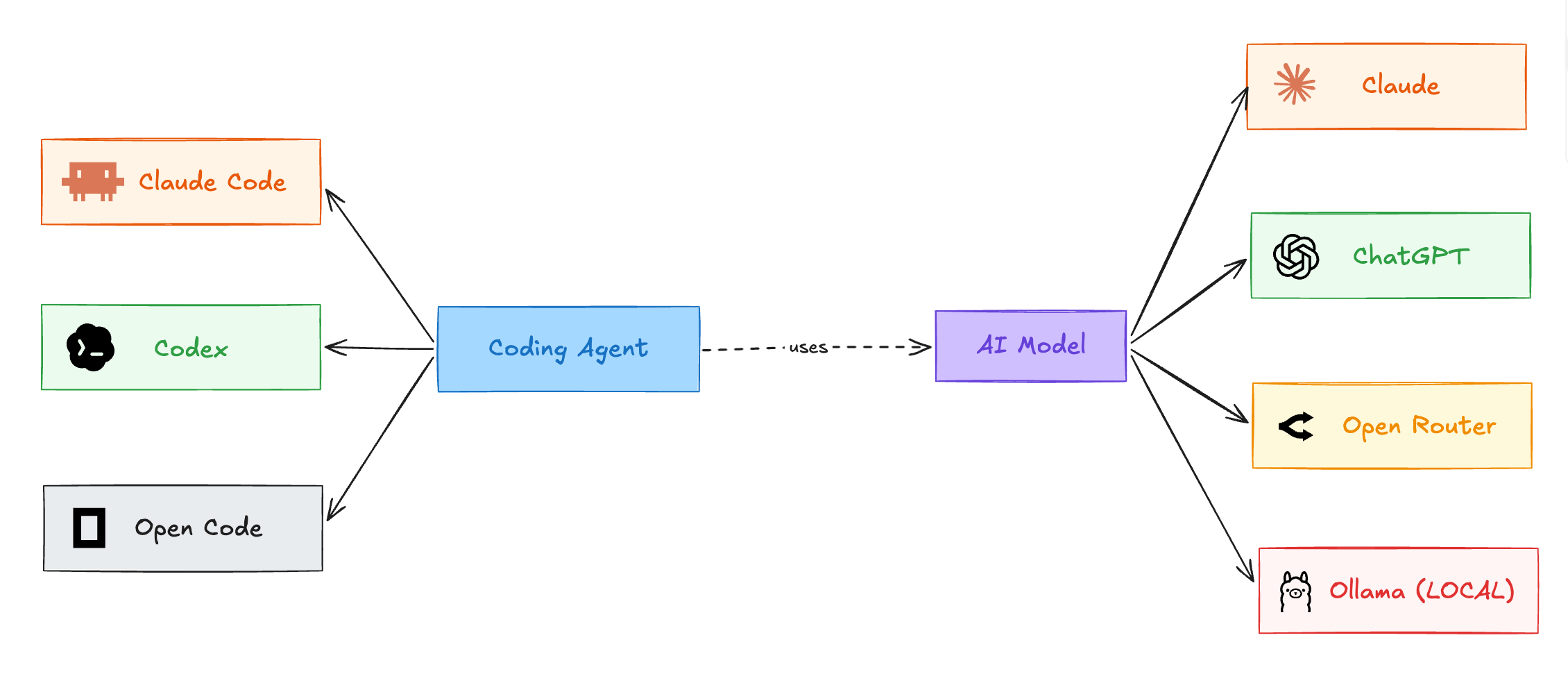
A coding agent exactly closes this gap. It can reach into your workspace and do the work itself. You still ask in plain words and it handles the rest.
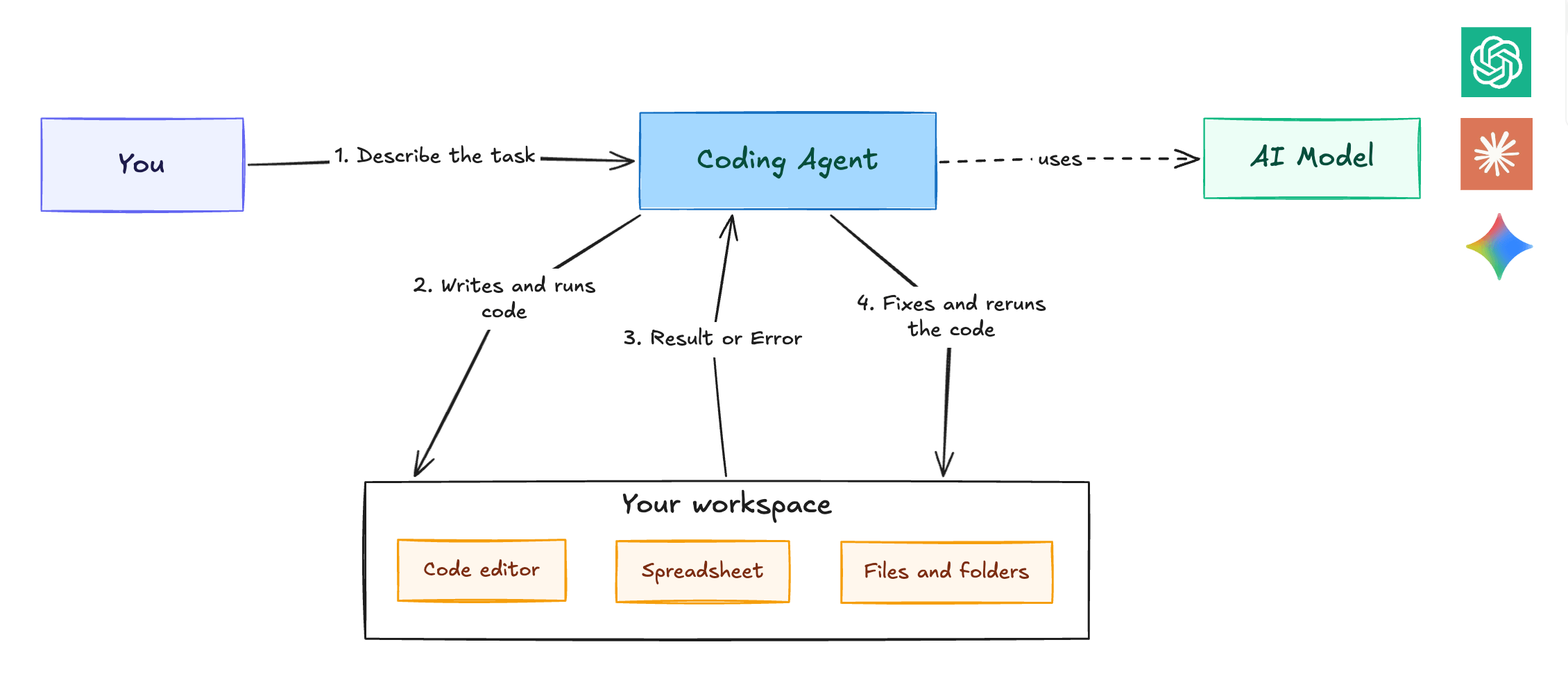
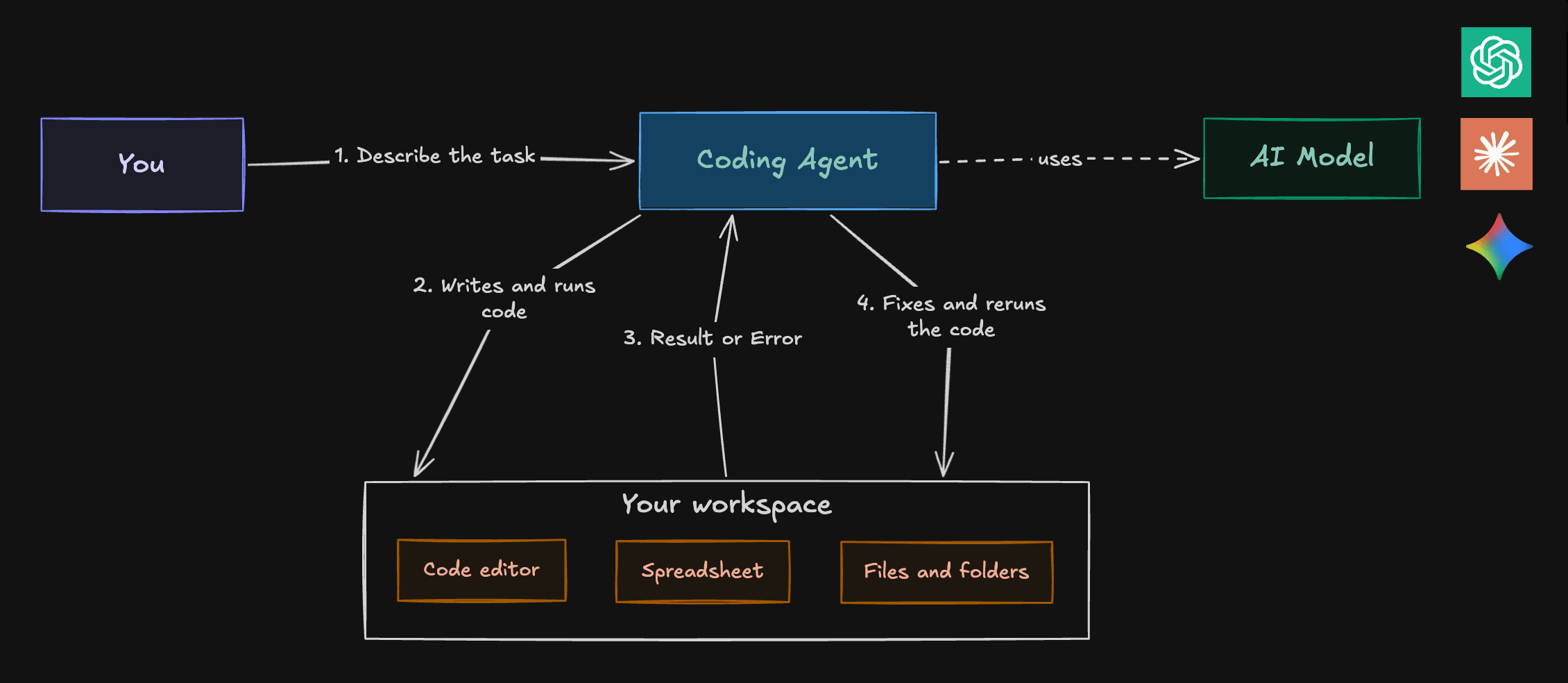
You can easily swap the 2 modules - Coding Agent and AI Model. In this doc you’ll learn how to set up various combinations of the agent and the model and how much each pairing will cost - starting from the most expensive to the least (free). The quality and performance will not be the same, so you can choose based on your budget and use case.
| Tier | Price | Best for |
|---|---|---|
| API Billing | Pay per use, no ceiling | Occasional or unpredictable use |
| Premium | $100–$200/month | Heavy, daily use |
| Entry-Level | $20/month | A few sessions a week — most people start here |
| Zero-Cost | Free | Just want to try it out |
The Infinite Spend Option: Coding Agents on API Billing
The costliest option is a coding agent like Claude Code or Codex paired with API-based billing from the companies behind Claude (Anthropic) and ChatGPT (OpenAI).
Here you are charged based on which model you use and how much you use it. There is no fixed monthly fee. You pay for exactly what you use, and there is no upper limit.
These are language models, so all text is broken down into tokens. To keep it simple, assume 1 word = 1 token. What you send to the model are input tokens. What the model sends back are output tokens.
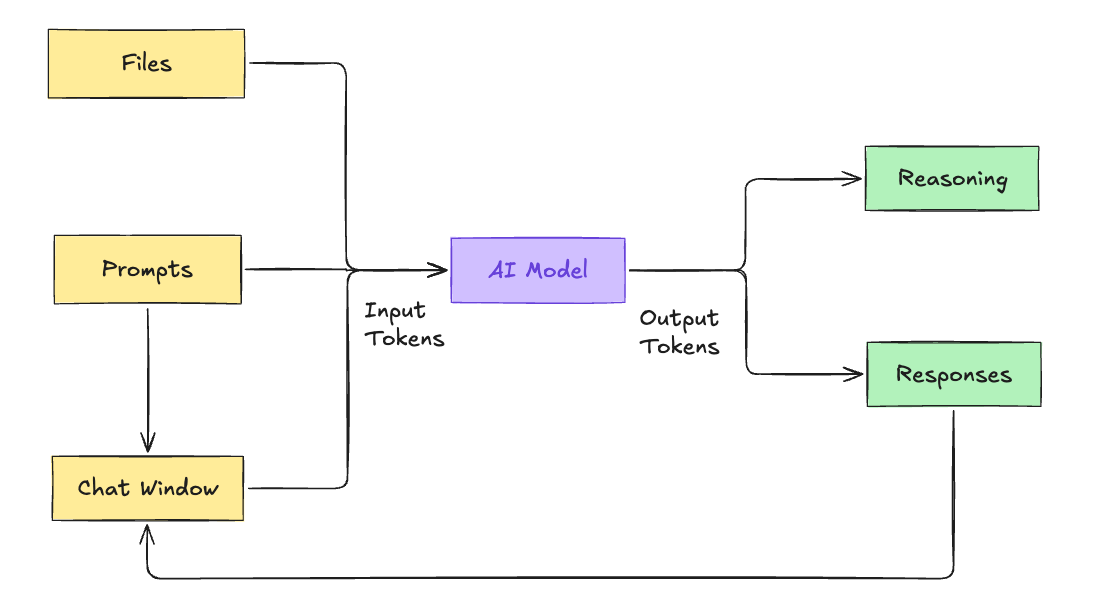
Every model sets its own input and output prices, and output costs more than input.
You pick the model based on the complexity of the task. A larger model gives you better results but costs more.
Here is the pricing for popular models as of July 2026:
| Provider | Model | Size | Input (per 1M tokens) | Output (per 1M tokens) |
|---|---|---|---|---|
| Anthropic | Haiku 4.5 | S | $1 | $5 |
| Sonnet 5 | M | $3 | $15 | |
| Opus 4.8 | L | $5 | $25 | |
| Fable 5 | XL | $10 | $50 | |
| OpenAI | GPT-5.6 Luna | S | $1 | $6 |
| GPT-5.6 Terra | M | $2.50 | $15 | |
| GPT-5.6 Sol | L | $5 | $30 |
The sizes above map to what each model can do:
| Size | Capability |
|---|---|
| S | Answers short questions, makes small code edits, and writes simple scripts. |
| M | Handles most everyday coding and writing tasks, including ones that take a few steps. |
| L | Writes and fixes complex code and works through problems that require many steps. |
| XL | Handles the toughest tasks and the longest jobs that run with little input from you. |
Setting It Up
1. Get your Anthropic API key
- Sign up or log in to the Anthropic Console.
- Open the Billing page, add a card, and buy some prepaid credits. Your usage is drawn from this balance, and you can turn on auto-reload so it tops up on its own when it runs low.
- Open the API keys page, click Create Key, give it a name, and copy the key. It starts with
sk-ant-and is shown only once, so paste it somewhere safe.
2. Install and save your key
Open the terminal: press Cmd+Space, type Terminal, and press Enter.
Install Claude Code:
curl -fsSL https://claude.ai/install.sh | bashCheck it worked:
claude --versionSave your key so it is remembered (replace with your own key):
echo 'export ANTHROPIC_API_KEY="sk-ant-your-key"' >> ~/.zshrc
source ~/.zshrc
Open PowerShell: press the Windows key, type PowerShell, and open Windows PowerShell (not Command Prompt).
Install Claude Code:
irm https://claude.ai/install.ps1 | iexCheck it worked:
claude --versionSave your key (replace with your own), then close and reopen PowerShell:
setx ANTHROPIC_API_KEY "sk-ant-your-key"Open the terminal: press Ctrl+Alt+T.
Install Claude Code:
curl -fsSL https://claude.ai/install.sh | bashCheck it worked:
claude --versionSave your key so it is remembered (replace with your own key):
echo 'export ANTHROPIC_API_KEY="sk-ant-your-key"' >> ~/.bashrc
source ~/.bashrc
3. Start it on a task
Make a folder for your project and go into it:
mkdir sales-check
cd sales-check
Start Claude Code from inside that folder:
claudeOn the first run, approve using the API key, then type /status to confirm it shows your API key.
Pick a model. Type this and choose one from the list:
/modelNow give it a task. Drop two sales reports into the folder, the same sales recorded by two different sources, then type:
Compare website-sales.csv and store-sales.csv.
List the rows that do not match and save them to a file called mismatches.csv.
1. Get your OpenAI API key
- Sign up or log in to the OpenAI developer platform. This is separate from a ChatGPT subscription.
- Open the Billing page, add a card, and buy some prepaid credits. Your usage is drawn from this balance, and you can turn on auto-recharge so it tops up on its own when it runs low. This is billed here, not through ChatGPT.
- Open the API keys page, click Create new secret key, and copy it. It starts with
sk-and is shown only once, so paste it somewhere safe.
2. Install and connect
Open the terminal: press Cmd+Space, type Terminal, and press Enter.
Install Codex:
curl -fsSL https://chatgpt.com/codex/install.sh | shCheck it worked:
codex --versionSave your key (replace with your own key):
echo 'export OPENAI_API_KEY="sk-your-key"' >> ~/.zshrc
source ~/.zshrc
Connect the key to Codex:
printenv OPENAI_API_KEY | codex login --with-api-keyOpen PowerShell: press the Windows key, type PowerShell, and open Windows PowerShell (not Command Prompt).
Install Codex:
powershell -ExecutionPolicy ByPass -c "irm https://chatgpt.com/codex/install.ps1 | iex"Check it worked:
codex --versionSave your key (replace with your own), then close and reopen PowerShell:
setx OPENAI_API_KEY "sk-your-key"Connect the key to Codex:
$env:OPENAI_API_KEY | codex login --with-api-keyOpen the terminal: press Ctrl+Alt+T.
Install Codex:
curl -fsSL https://chatgpt.com/codex/install.sh | shCheck it worked:
codex --versionSave your key (replace with your own key):
echo 'export OPENAI_API_KEY="sk-your-key"' >> ~/.bashrc
source ~/.bashrc
Connect the key to Codex:
printenv OPENAI_API_KEY | codex login --with-api-key3. Start it on a task
Make a folder for your project and go into it:
mkdir sales-check
cd sales-check
Start Codex from inside that folder, then confirm it is using your API key:
codex
codex login status
Pick a model. Type this and choose one from the list:
/modelNow give it a task. Drop two sales reports into the folder, the same sales recorded by two different sources, then type:
Compare website-sales.csv and store-sales.csv.
List the rows that do not match and save them to a file called mismatches.csv.
The Catch
This is the most expensive option because it has no ceiling. The more you run the agent, the more you pay.
So if you expect to lean on a coding agent often, a subscription is usually the better deal. That is the next option: Claude Max or ChatGPT Pro. You pay a flat monthly fee and get a large allowance of use, spread across session and weekly limits.
If you hit a limit and need to keep going before it resets, you can switch the same agent over to API billing to cover the gap. A subscription for the bulk of the work, API billing for the overflow, is what the next section sets up.
The High Cost Option: Coding Agents on Premium Billing
The next step down is a premium subscription.
Claude has a cheaper Pro plan and a premium Max plan. Codex has a cheaper Plus plan and a premium Pro plan. We discuss the cheaper entry plans in the next section.
The premium plans come in two options, 5X and 20X. Here is the pricing:
| Provider | Plan | Per month (USD) | Per month (INR) |
|---|---|---|---|
| Anthropic | Claude Pro | $20 | ₹2,399 |
| Claude Max 5X | $100 | ₹11,999 | |
| Claude Max 20X | $200 | ₹23,999 | |
| OpenAI | ChatGPT Plus | $20 | ₹1,999 |
| ChatGPT Pro 5X | $100 | ₹10,699 | |
| ChatGPT Pro 20X | $200 | ₹19,900 |
The subscription plans come with usage limits, and the premium plans simply provide 5X and 20X of the entry level’s usage limits.
When you send your first message, the 5-hour session window starts, and there is a limit to how much you can use the agent in this window. There is also a weekly limit, and your combined 5-hour session usage contributes to it. If you reach a limit, you’ll have to wait for it to reset to continue, or you can use API billing to continue the task.
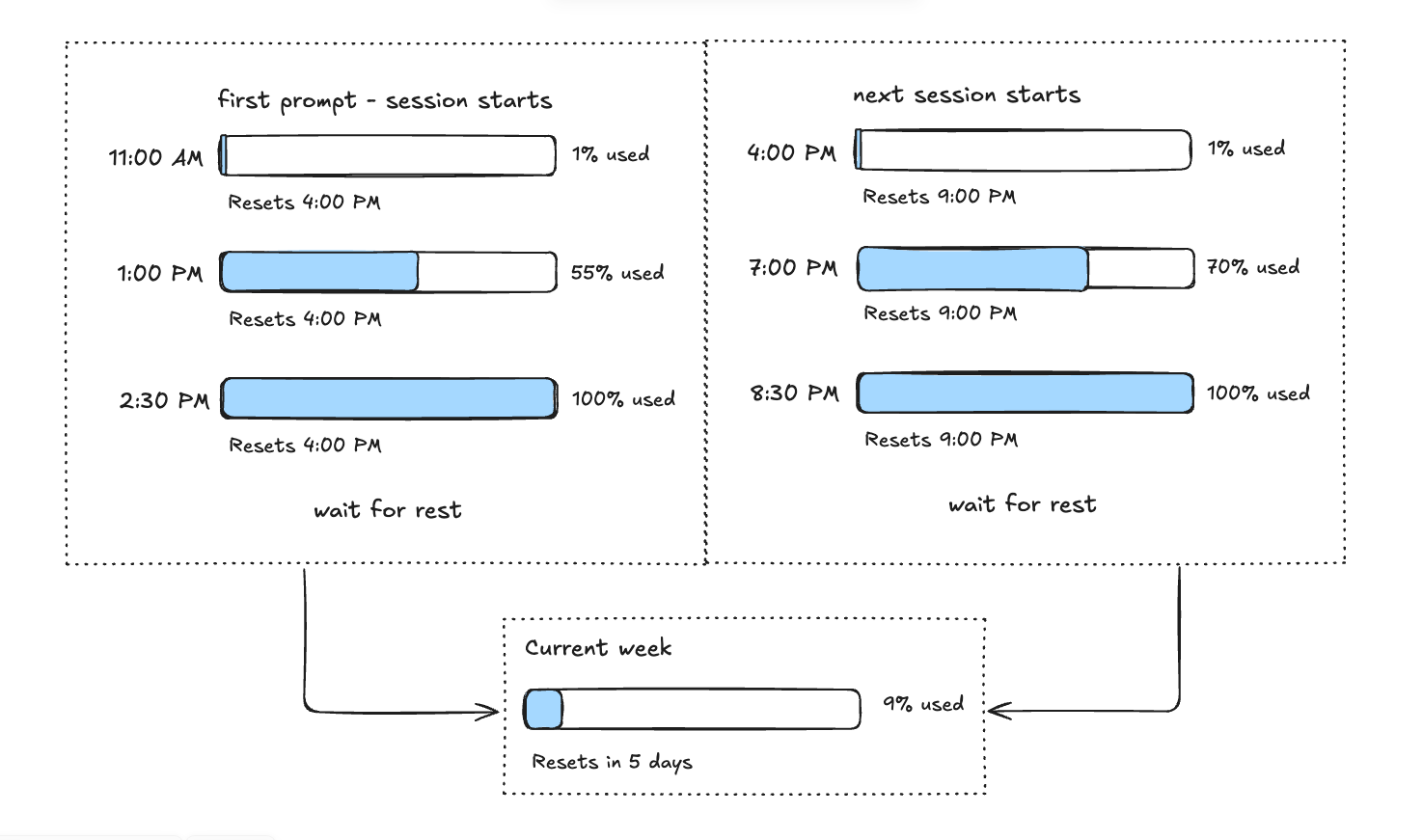
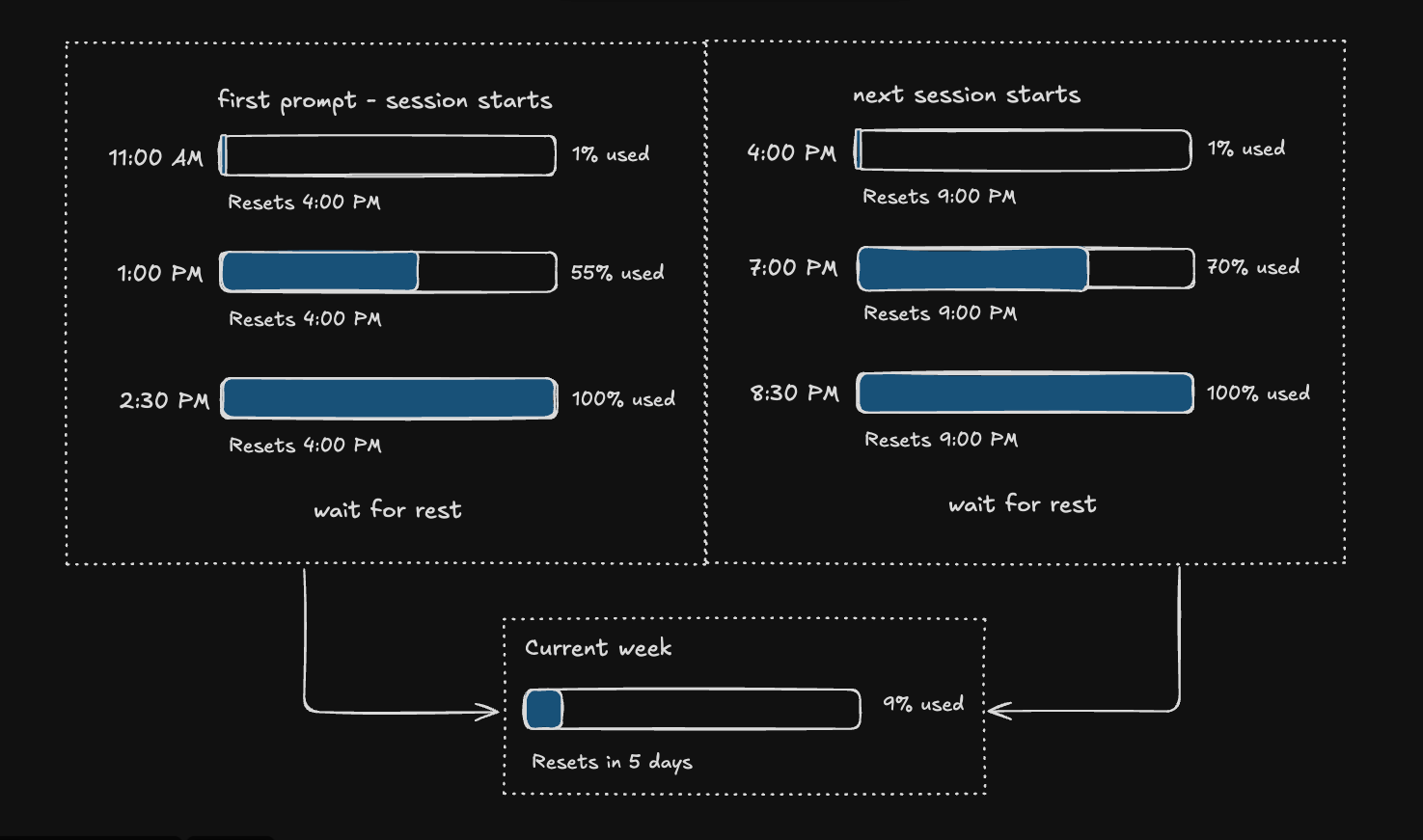
Every model has its own usage cost.
You pick the model based on the complexity of the task. A larger model gives you better results but consumes usage faster.
Here is roughly how many prompts a single 5-hour window gets you, model by model:
| Provider | Model | Size | Entry | 5X | 20X |
|---|---|---|---|---|---|
| Anthropic | Haiku 4.5 | S | 25–110 | 125–550 | 500–2,200 |
| Sonnet 5 | M | 10–45 | 50–225 | 200–900 | |
| Opus 4.8 | L | 8–34 | 40–170 | 160–680 | |
| Fable 5 | XL | 4–17 | 20–85 | 80–340 | |
| OpenAI | GPT-5.6 Luna | S | 50–280 | 250–1,400 | 1,000–5,600 |
| GPT-5.6 Terra | M | 20–110 | 100–550 | 400–2,200 | |
| GPT-5.6 Sol | L | 15–90 | 75–450 | 300–1,800 |
On the mid-size model, those ranges feel like this:
| Tier | Feels like |
|---|---|
| Entry | An hour or two of back and forth, then you wait for the window to reset. |
| Premium 5X | A solid working day, most days of the week. |
| Premium 20X | All week, unless you keep the agent running almost constantly. |
Setting It Up
1. Subscribe to Claude Max
- Sign up or log in to Claude.
- Open Settings and Billing and upgrade to Max. Pick 5X to start. You can move up later without losing anything.
- There is no API key here and nothing to copy. The plan is attached to the account you just logged in with.
2. Install and sign in
Open the terminal: press Cmd+Space, type Terminal, and press Enter.
Install Claude Code:
curl -fsSL https://claude.ai/install.sh | bashCheck it worked:
claude --versionIf you followed the previous section, remove the API key first or it will keep billing your API account instead of your plan. Delete the ANTHROPIC_API_KEY line from ~/.zshrc, then run unset ANTHROPIC_API_KEY.
Start it and sign in through the browser when it asks:
claudeOpen PowerShell: press the Windows key, type PowerShell, and open Windows PowerShell (not Command Prompt).
Install Claude Code:
irm https://claude.ai/install.ps1 | iexCheck it worked:
claude --versionIf you followed the previous section, clear the API key first or it will keep billing your API account instead of your plan. Run setx ANTHROPIC_API_KEY "", then close and reopen PowerShell.
Start it and sign in through the browser when it asks:
claudeOpen the terminal: press Ctrl+Alt+T.
Install Claude Code:
curl -fsSL https://claude.ai/install.sh | bashCheck it worked:
claude --versionIf you followed the previous section, remove the API key first or it will keep billing your API account instead of your plan. Delete the ANTHROPIC_API_KEY line from ~/.bashrc, then run unset ANTHROPIC_API_KEY.
Start it and sign in through the browser when it asks:
claude3. Start it on a task
Confirm it is running on your plan and not on an API key:
/statusMake a folder for your project and go into it:
mkdir sales-check
cd sales-check
Start Claude Code from inside that folder:
claudePick a model. Bigger models eat your allowance faster, so start in the middle:
/modelNow give it a task. Drop two sales reports into the folder, the same sales recorded by two different sources, then type:
Compare website-sales.csv and store-sales.csv.
List the rows that do not match and save them to a file called mismatches.csv.
1. Subscribe to ChatGPT Pro
- Sign up or log in to ChatGPT.
- Open your account settings and upgrade to Pro. Choose 5X to start. Pro 20X is the same plan with a larger allowance.
- Nothing to copy here either. Codex reads the plan from the account you sign in with.
2. Install and sign in
Open the terminal: press Cmd+Space, type Terminal, and press Enter.
Install Codex:
curl -fsSL https://chatgpt.com/codex/install.sh | shCheck it worked:
codex --versionIf you followed the previous section, remove the API key first. Delete the OPENAI_API_KEY line from ~/.zshrc, then run unset OPENAI_API_KEY.
Now run the plain login, the one the previous section told you to skip:
codex loginOpen PowerShell: press the Windows key, type PowerShell, and open Windows PowerShell (not Command Prompt).
Install Codex:
powershell -ExecutionPolicy ByPass -c "irm https://chatgpt.com/codex/install.ps1 | iex"Check it worked:
codex --versionIf you followed the previous section, clear the API key first. Run setx OPENAI_API_KEY "", then close and reopen PowerShell.
Now run the plain login, the one the previous section told you to skip:
codex loginOpen the terminal: press Ctrl+Alt+T.
Install Codex:
curl -fsSL https://chatgpt.com/codex/install.sh | shCheck it worked:
codex --versionIf you followed the previous section, remove the API key first. Delete the OPENAI_API_KEY line from ~/.bashrc, then run unset OPENAI_API_KEY.
Now run the plain login, the one the previous section told you to skip:
codex login3. Start it on a task
Confirm it is signed in with your subscription:
codex login statusMake a folder for your project and go into it:
mkdir sales-check
cd sales-check
Start Codex from inside that folder:
codexPick a model. Bigger models eat your allowance faster, so start in the middle:
/modelNow give it a task. Drop two sales reports into the folder, the same sales recorded by two different sources, then type:
Compare website-sales.csv and store-sales.csv.
List the rows that do not match and save them to a file called mismatches.csv.
The Catch
Go for a premium option if you have heavy coding tasks, starting out with a 5X plan first.
If you expect to have few coding tasks in your week, go for an entry-level plan. We cover that in the next section.
The Entry-Level Option: Coding Agents on Standard Billing
This is the sweet spot. If you’re not sure where to start, this is it.
We have already discussed how the usage limits and pricing work in the previous section.
If you are already using the free plans, in Claude you’ll have to upgrade to Claude Pro to access Claude Code. But in ChatGPT, you already get limited Codex access; upgrade to ChatGPT Plus to get expanded Codex usage.
Setting It Up
1. Subscribe to Claude Pro
- Sign up or log in to Claude.
- Claude Code needs a paid plan. Open Settings and Billing and upgrade to Pro.
- There is no API key here and nothing to copy. The plan is attached to the account you just logged in with.
2. Install and sign in
Open the terminal: press Cmd+Space, type Terminal, and press Enter.
Install Claude Code:
curl -fsSL https://claude.ai/install.sh | bashCheck it worked:
claude --versionIf you followed an earlier section, remove the API key first or it will keep billing your API account instead of your plan. Delete the ANTHROPIC_API_KEY line from ~/.zshrc, then run unset ANTHROPIC_API_KEY.
Start it and sign in through the browser when it asks:
claudeOpen PowerShell: press the Windows key, type PowerShell, and open Windows PowerShell (not Command Prompt).
Install Claude Code:
irm https://claude.ai/install.ps1 | iexCheck it worked:
claude --versionIf you followed an earlier section, clear the API key first or it will keep billing your API account instead of your plan. Run setx ANTHROPIC_API_KEY "", then close and reopen PowerShell.
Start it and sign in through the browser when it asks:
claudeOpen the terminal: press Ctrl+Alt+T.
Install Claude Code:
curl -fsSL https://claude.ai/install.sh | bashCheck it worked:
claude --versionIf you followed an earlier section, remove the API key first or it will keep billing your API account instead of your plan. Delete the ANTHROPIC_API_KEY line from ~/.bashrc, then run unset ANTHROPIC_API_KEY.
Start it and sign in through the browser when it asks:
claude3. Start it on a task
Confirm it is running on your plan and not on an API key:
/statusMake a folder for your project and go into it:
mkdir sales-check
cd sales-check
Start Claude Code from inside that folder:
claudePick a model. Type this and choose one from the list:
/modelNow give it a task. Drop two sales reports into the folder, the same sales recorded by two different sources, then type:
Compare website-sales.csv and store-sales.csv.
List the rows that do not match and save them to a file called mismatches.csv.
1. Subscribe to ChatGPT Plus
- Sign up or log in to ChatGPT.
- You already get limited Codex access on the free plan. Open your account settings and upgrade to Plus for expanded usage.
- Nothing to copy here either. Codex reads the plan from the account you sign in with.
2. Install and sign in
Open the terminal: press Cmd+Space, type Terminal, and press Enter.
Install Codex:
curl -fsSL https://chatgpt.com/codex/install.sh | shCheck it worked:
codex --versionIf you followed an earlier section, remove the API key first. Delete the OPENAI_API_KEY line from ~/.zshrc, then run unset OPENAI_API_KEY.
Sign in with your account:
codex loginOpen PowerShell: press the Windows key, type PowerShell, and open Windows PowerShell (not Command Prompt).
Install Codex:
powershell -ExecutionPolicy ByPass -c "irm https://chatgpt.com/codex/install.ps1 | iex"Check it worked:
codex --versionIf you followed an earlier section, clear the API key first. Run setx OPENAI_API_KEY "", then close and reopen PowerShell.
Sign in with your account:
codex loginOpen the terminal: press Ctrl+Alt+T.
Install Codex:
curl -fsSL https://chatgpt.com/codex/install.sh | shCheck it worked:
codex --versionIf you followed an earlier section, remove the API key first. Delete the OPENAI_API_KEY line from ~/.bashrc, then run unset OPENAI_API_KEY.
Sign in with your account:
codex login3. Start it on a task
Confirm it is signed in with your subscription:
codex login statusMake a folder for your project and go into it:
mkdir sales-check
cd sales-check
Start Codex from inside that folder:
codexPick a model. Type this and choose one from the list:
/modelNow give it a task. Drop two sales reports into the folder, the same sales recorded by two different sources, then type:
Compare website-sales.csv and store-sales.csv.
List the rows that do not match and save them to a file called mismatches.csv.
The Catch
If you are using the Claude and ChatGPT chats along with the coding agent, note that both will contribute towards usage limits. So try to have only one source of interaction to avoid surprises.
Coding agents can do general chats and research too. If you are researching something and then need to implement a solution based on it, it’s better to do both in the same coding agent session instead of switching between chat and agent.
The Zero-Cost Option: Coding Agents on OpenRouter
If you are a student who wants to try out a coding agent at zero cost and with minimal setup, OpenRouter is the answer.
OpenRouter works just like a coding agent with API billing. It is a service that gives you unified access to different models through a single API.
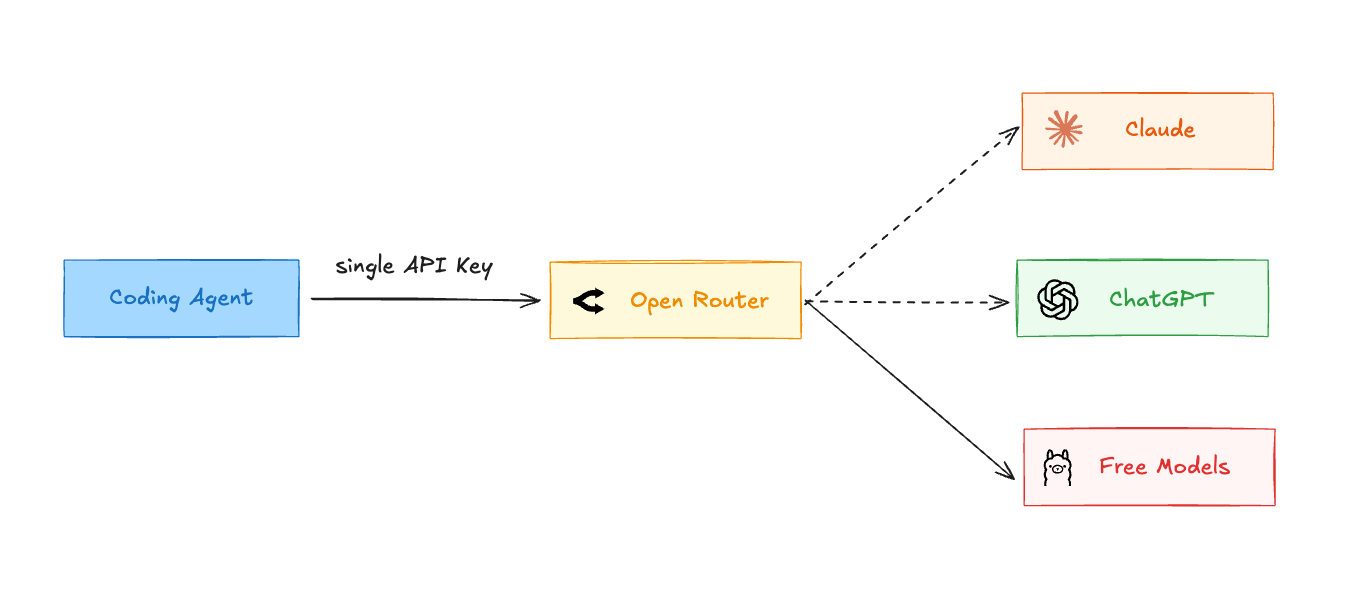
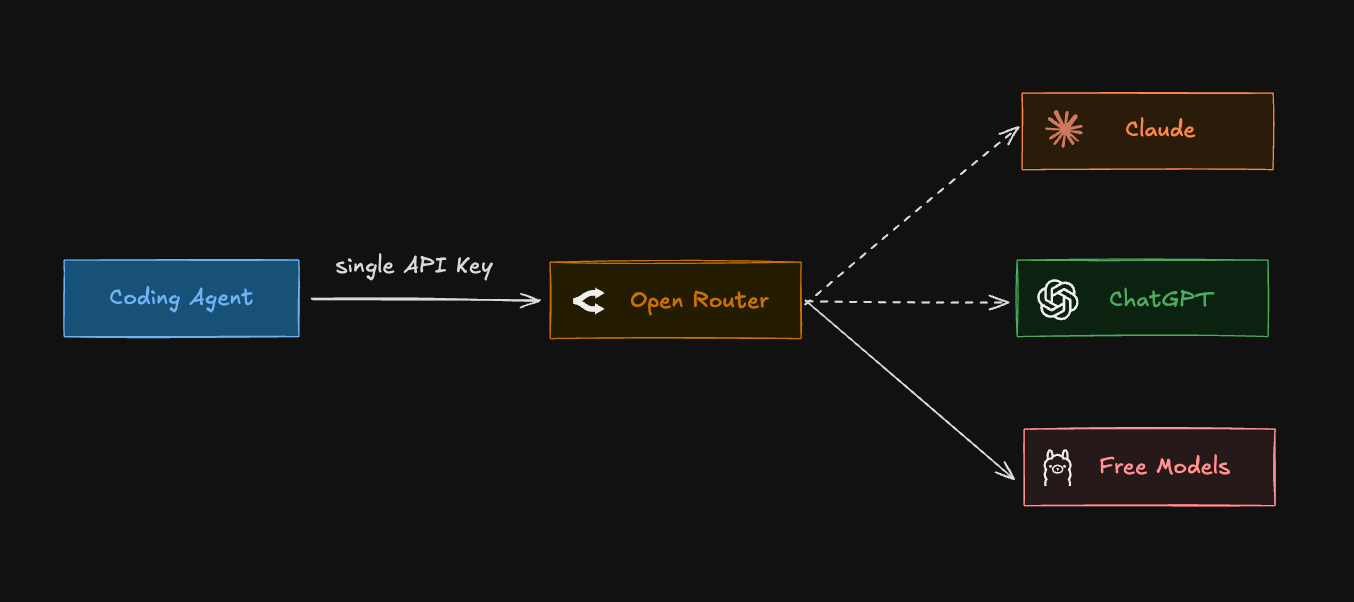
In the API Billing option, you are locked into the provider of the models. With Claude Code, you can only use Claude models, and with Codex, you can only use ChatGPT models.
With OpenRouter, you get the flexibility of switching between models, with the option of choosing from models that are free to use.
| Model | What to expect | Switch in Claude Code | Switch in Codex |
|---|---|---|---|
| Nemotron 3 Ultra | A large, general-purpose model marketed for agent and coding use. More headroom for bigger tasks, but expect slower replies than the two below. | /model nvidia/nemotron-3-ultra-550b-a55b:free | codex --model nvidia/nemotron-3-ultra-550b-a55b:free |
| North Mini Code | Built specifically for coding agents. Handles multi-step tasks and tool calls well, and tested faster than some larger models. | /model cohere/north-mini-code:free | codex --model cohere/north-mini-code:free |
| Laguna S 2.1 | Made by a startup that only builds coding-agent models. Good at multi-step reasoning. | /model poolside/laguna-s-2.1:free | codex --model poolside/laguna-s-2.1:free |
Free models get delisted and added often, so check OpenRouter’s live free-model list before you rely on one for the long run.
Setting It Up
1. Create an OpenRouter API key
- Sign up or log in to OpenRouter.
- Click Create Key and copy it. It starts with
sk-or-and is shown only once, so paste it somewhere safe.
2. Install and point Claude Code at OpenRouter
Open the terminal: press Cmd+Space, type Terminal, and press Enter.
Install Claude Code:
curl -fsSL https://claude.ai/install.sh | bashCheck it worked:
claude --versionIf you followed an earlier section, remove the old key first. Delete the ANTHROPIC_API_KEY line from ~/.zshrc, then run unset ANTHROPIC_API_KEY.
Point it at OpenRouter (replace with your own key):
echo 'export OPENROUTER_API_KEY="sk-or-your-key"' >> ~/.zshrc
echo 'export ANTHROPIC_BASE_URL="https://openrouter.ai/api"' >> ~/.zshrc
echo 'export ANTHROPIC_AUTH_TOKEN="$OPENROUTER_API_KEY"' >> ~/.zshrc
echo 'export ANTHROPIC_API_KEY=""' >> ~/.zshrc
source ~/.zshrc
OpenRouter says Claude Code works most reliably with Anthropic-hosted models routed through it. Pick a free, non-Anthropic model instead, and tool calls may not behave as well.
Open PowerShell: press the Windows key, type PowerShell, and open Windows PowerShell (not Command Prompt).
Install Claude Code:
irm https://claude.ai/install.ps1 | iexCheck it worked:
claude --versionIf you followed an earlier section, clear the old key first. Run setx ANTHROPIC_API_KEY "", then close and reopen PowerShell.
Point it at OpenRouter (replace with your own key), then close and reopen PowerShell:
setx OPENROUTER_API_KEY "sk-or-your-key"
setx ANTHROPIC_BASE_URL "https://openrouter.ai/api"
setx ANTHROPIC_AUTH_TOKEN "sk-or-your-key"
setx ANTHROPIC_API_KEY ""
OpenRouter says Claude Code works most reliably with Anthropic-hosted models routed through it. Pick a free, non-Anthropic model instead, and tool calls may not behave as well.
Open the terminal: press Ctrl+Alt+T.
Install Claude Code:
curl -fsSL https://claude.ai/install.sh | bashCheck it worked:
claude --versionIf you followed an earlier section, remove the old key first. Delete the ANTHROPIC_API_KEY line from ~/.bashrc, then run unset ANTHROPIC_API_KEY.
Point it at OpenRouter (replace with your own key):
echo 'export OPENROUTER_API_KEY="sk-or-your-key"' >> ~/.bashrc
echo 'export ANTHROPIC_BASE_URL="https://openrouter.ai/api"' >> ~/.bashrc
echo 'export ANTHROPIC_AUTH_TOKEN="$OPENROUTER_API_KEY"' >> ~/.bashrc
echo 'export ANTHROPIC_API_KEY=""' >> ~/.bashrc
source ~/.bashrc
OpenRouter says Claude Code works most reliably with Anthropic-hosted models routed through it. Pick a free, non-Anthropic model instead, and tool calls may not behave as well.
3. Start it on a task
Make a folder for your project and go into it:
mkdir sales-check
cd sales-check
Start Claude Code from inside that folder:
claudeConfirm it is using OpenRouter:
/statusSwitch to one of the free models from the table above by typing its slug:
/model cohere/north-mini-code:freeNow give it a task. Drop two sales reports into the folder, the same sales recorded by two different sources, then type:
Compare website-sales.csv and store-sales.csv.
List the rows that do not match and save them to a file called mismatches.csv.
1. Create an OpenRouter API key
- Sign up or log in to OpenRouter.
- Click Create Key and copy it. It starts with
sk-or-and is shown only once, so paste it somewhere safe.
2. Install and point Codex at OpenRouter
Open the terminal: press Cmd+Space, type Terminal, and press Enter.
Install Codex:
curl -fsSL https://chatgpt.com/codex/install.sh | shCheck it worked:
codex --versionIf you followed an earlier section, remove the old key first. Delete the OPENAI_API_KEY line from ~/.zshrc, then run unset OPENAI_API_KEY.
Save your OpenRouter key (replace with your own key):
echo 'export OPENROUTER_API_KEY="sk-or-your-key"' >> ~/.zshrc
source ~/.zshrc
Pick a slug from the table above, or browse OpenRouter's free models for another. Then create ~/.codex/config.toml with this, swapping in the slug you picked:
model_provider = "openrouter"
model = "cohere/north-mini-code:free"
[model_providers.openrouter]
name = “OpenRouter”
base_url = “https://openrouter.ai/api/v1”
env_key = “OPENROUTER_API_KEY”
Open PowerShell: press the Windows key, type PowerShell, and open Windows PowerShell (not Command Prompt).
Install Codex:
powershell -ExecutionPolicy ByPass -c "irm https://chatgpt.com/codex/install.ps1 | iex"Check it worked:
codex --versionIf you followed an earlier section, clear the old key first. Run setx OPENAI_API_KEY "", then close and reopen PowerShell.
Save your OpenRouter key (replace with your own), then close and reopen PowerShell:
setx OPENROUTER_API_KEY "sk-or-your-key"Pick a slug from the table above, or browse OpenRouter's free models for another. Then create ~/.codex/config.toml with this, swapping in the slug you picked:
model_provider = "openrouter"
model = "cohere/north-mini-code:free"
[model_providers.openrouter]
name = “OpenRouter”
base_url = “https://openrouter.ai/api/v1”
env_key = “OPENROUTER_API_KEY”
Open the terminal: press Ctrl+Alt+T.
Install Codex:
curl -fsSL https://chatgpt.com/codex/install.sh | shCheck it worked:
codex --versionIf you followed an earlier section, remove the old key first. Delete the OPENAI_API_KEY line from ~/.bashrc, then run unset OPENAI_API_KEY.
Save your OpenRouter key (replace with your own key):
echo 'export OPENROUTER_API_KEY="sk-or-your-key"' >> ~/.bashrc
source ~/.bashrc
Pick a slug from the table above, or browse OpenRouter's free models for another. Then create ~/.codex/config.toml with this, swapping in the slug you picked:
model_provider = "openrouter"
model = "cohere/north-mini-code:free"
[model_providers.openrouter]
name = “OpenRouter”
base_url = “https://openrouter.ai/api/v1”
env_key = “OPENROUTER_API_KEY”
3. Start it on a task
Make a folder for your project and go into it:
mkdir sales-check
cd sales-check
Start Codex from inside that folder:
codexTo try a different free model without editing the file again, override it for one run:
codex --model poolside/laguna-s-2.1:freeNow give it a task. Drop two sales reports into the folder, the same sales recorded by two different sources, then type:
Compare website-sales.csv and store-sales.csv.
List the rows that do not match and save them to a file called mismatches.csv.
The Catch
If you are using a free model variant (with an ID ending in :free), then OpenRouter applies the following limits: 20 requests per minute and 50 requests per day.
A coding agent will consume this quickly, hence only go with this option if you just want to try it out.
There is another way of having unlimited usage, but it requires an investment in hardware to run the AI models locally. I will write another blog soon on how to set up coding agents with models running locally on various hardware options. It will compare their performance on each option against the models from providers like Anthropic and OpenAI.